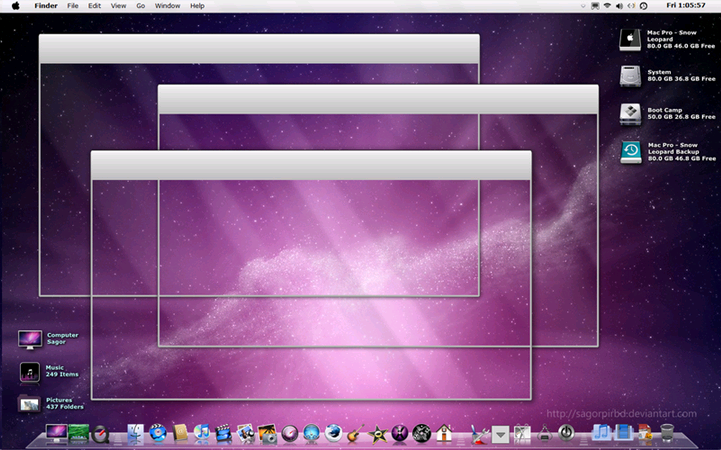
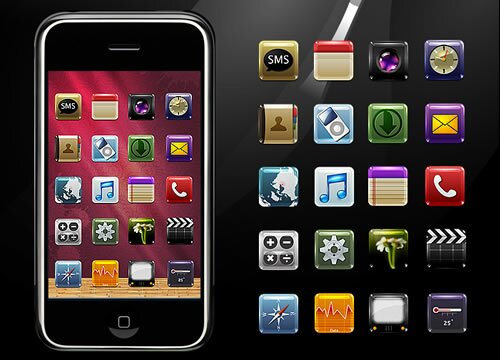
A round up of the best icon packs on the web. Full credit goes to the image authors. Let us know about any others you really like!
Want More Icons?
Check out more icon collections on Mintywhite.com or learn how to use these on a dock in Windows.
A round up of the best icon packs on the web. Full credit goes to the image authors. Let us know about any others you really like!
Check out more icon collections on Mintywhite.com or learn how to use these on a dock in Windows.
A round up of the best icon packs on the web. Full credit goes to the image authors. Let us know about any others you really like!
Check out more icon collections on Mintywhite.com or learn how to use these on a dock in Windows.
A round up of the best icon packs on the web. Full credit goes to the image authors. Let us know about any others you really like!
Check out more icon collections on Mintywhite.com or learn how to use these on a dock in Windows.
This guide is part of the Windows Desktop Theme Customization Series. If you want to learn how to install Themes in your version of Windows or want to locate some new themes, head here. If you’d like to keep up with this series and other articles from this site, subscribe here.
Note: Please create a create a restore point before patching system files. Many themes only work on a specific operating system, architeture, and service pack. i.e. Vista SP2 x86. Please read the instructions for each theme very carefully.
Installing desktop themes on your Vista or Windows Server 2008 machine takes just a few minutes . Learn, in this guide, how to patch system files and install themes.
A round up of the best icon packs on the web. Full credit goes to the image authors. Let us know about any others you really like!
Check out more icon collections on Mintywhite.com or learn how to use these on a dock in Windows.
A round up of the best icon packs on the web. Full credit goes to the image authors. Let us know about any others you really like!
Check out more icon collections on Mintywhite.com or learn how to use these on a dock in Windows.
Every month we take a look around some of the most interesting windows-related web sites. We collect the best free stuff and write tips to help you get more out of Windows. Below you’ll find wallpapers, icon packs, fonts, screensavers, and freeware we’ve found over the last 31 days. We’ve also put together our most popular windows guides.
Enjoy the overview of stuff you shouldn’t have missed in August 2009
Here at mintywhite.com, we love Icon Packs. In this collection, I’ve picked my favorite RSS icon packs. Enjoy these packs and please feel free to suggest some more.
Full credit goes to the authors of the packs. Please take time when you visit their sites to check out other packs and goodies they have to offer.
Check out more icon collections on Mintywhite.com or learn how to use these on a dock in Windows.
Read the rest of this entry »
Here at mintywhite.com, we love Icon Packs. In this collection, I’ve picked my favorite RSS icon packs. Enjoy these packs and please feel free to suggest some more.
Full credit goes to the authors of the packs. Please take time when you visit their sites to check out other packs and goodies they have to offer.
Want More Icons?
Check out more icon collections on Mintywhite.com or learn how to use these on a dock in Windows.
Read the rest of this entry »
There are many ways to organize your files on your computer and provide shortcuts to them. In this guide, I hope to provide some inspiration; hopefully you can come up with some great ways to access the data on your drive.
I’ve written about how to organize your files in the past and in this guide I will focus mainly on how to get to those files easily without installing any extra software.
I don’t store my personal documents in the conventional place Windows provides. This is because I frequently change operating systems and have different systems on one machine so I need a central repository of files. More information about this can be read here including instructions of how to implement this properly.
I highly recommend organizing your files in an intuitive and efficient manner before working on how to get to them. Below is a screenshot of my E partition which is my media drive on my laptop:
![Creative Folder Shortcut Links in Vista [How To] Shortcuts 01](http://img.mywindowspc.com/wg/0904/smart-links01.png)
As you can see, I organize my files by media type and I’ve also customized the folder icons.
Recently, I’ve taken to using over-sized shortcuts on my desktop. I don’t usually have any icons on my desktop but I’ve found the shortcuts to be both aesthetically pleasing and useful.
(Click to enlarge)
To achieve this effect, do the following:
You now have a desktop with oversized and stylish shortcuts.
![Creative Folder Shortcut Links in Vista [How To] Shortcuts 09](http://img.mywindowspc.com/wg/0904/smart-links09.png)
If you have a setup similar to mine, mentioned above, you can easily make a shortcut to all the folders appear on your taskbar with the icons you previously selected. To achieve the effect shown above, do the following:
![Creative Folder Shortcut Links in Vista [How To] Shortcuts 04](http://img.mywindowspc.com/wg/0904/smart-links04.png)
![Creative Folder Shortcut Links in Vista [How To] Shortcuts 05](http://img.mywindowspc.com/wg/0904/smart-links05.png)
![Creative Folder Shortcut Links in Vista [How To] Shortcuts 06](http://img.mywindowspc.com/wg/0904/smart-links06.png)
The previous steps may be enough to provide you with a useful shortcut system; to change the text label to icons, do the following:
![Creative Folder Shortcut Links in Vista [How To] Shortcuts 07](http://img.mywindowspc.com/wg/0904/smart-links07.png)
![Creative Folder Shortcut Links in Vista [How To] Shortcuts 08](http://img.mywindowspc.com/wg/0904/smart-links08.png)
![Creative Folder Shortcut Links in Vista [How To] Shortcuts 09](http://img.mywindowspc.com/wg/0904/smart-links09.png)
Do you have any other ways to customize your shortcut icons? Do you have a good Dock-style solution or method that does not require extra software? Please share your thoughts in the comments.